Download PetPeek
For Macs with Apple silicon or Intel, running macOS 12 Monterey or newer.
Download for MacWindows is coming later. Not bought PetPeek yet? Get it for $20, one-time, no subscription.
Install in 3 steps
1 Open PetPeek.dmg from your Downloads, then drag PetPeek onto the Applications folder.
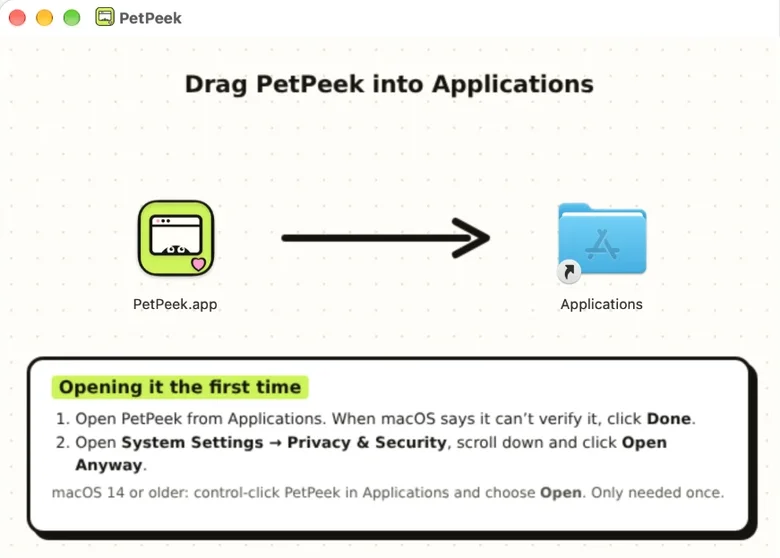
2 Open PetPeek from Applications. The first time, macOS says it couldn’t verify PetPeek. Click Done, not Move to Trash (or Bin).
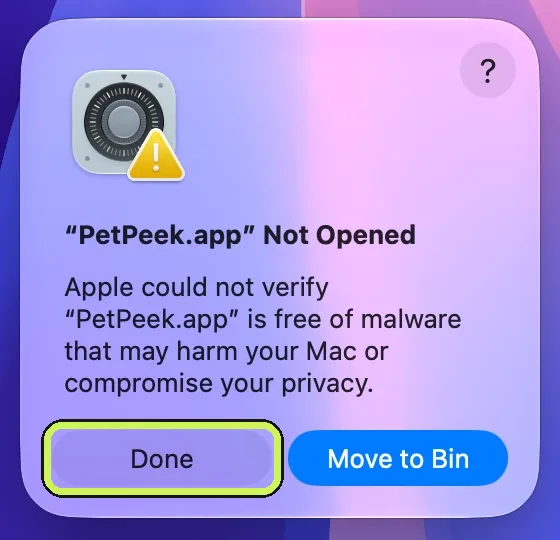
This appears because PetPeek isn’t registered with Apple’s paid developer programme yet. You only see it once.
3 Open System Settings → Privacy & Security, scroll down to Security and click Open Anyway. Enter your Mac password, then click Open Anyway once more.
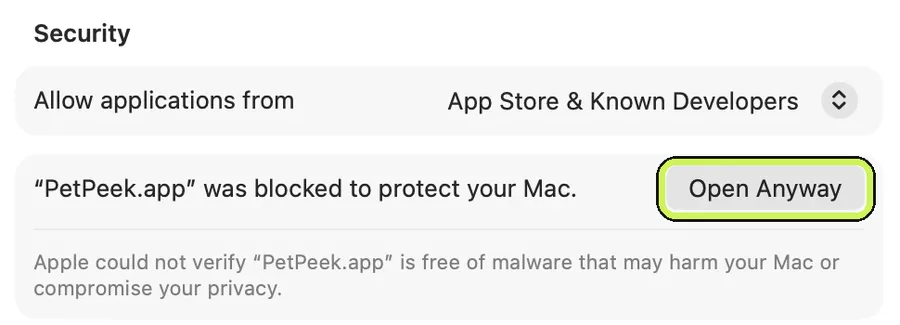
On macOS 14 Sonoma or older? Skip steps 2 and 3: in Applications, hold control and click PetPeek, choose Open, then click Open again.
Then
Click Open PetPeek on your receipt page to unlock it, or paste your licence key in Settings → Your licence. Lost your key? Email [email protected] with the address you bought with.